The Helium 10 Mobile App allows Amazon sellers to monitor business performance, advertising campaigns, product alerts, and account settings directly from their mobile devices. Available on both iOS and Android, the app provides real-time visibility into your Amazon business so you can make informed decisions anytime, anywhere.
Homepage Overview
The Homepage serves as your primary dashboard. It contains two main sections that you can switch between by swiping left or right:
1. Profits Dashboard
2. Helium 10 Ads Dashboard
Profits Dashboard
The Profits section provides a high-level financial snapshot of your Amazon business within a selected time period.
Available Date Filters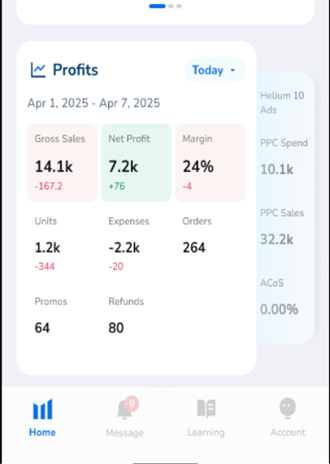
- Today
- Yesterday
- This Week
- Last Week
- Last 7 Days
- Last 14 days
- This Month
- Custom
Tip: Green values indicate growth compared to the previous period, while red values indicate a decline.
Key Financial Metrics Explained
- Gross Sales – Total product sales before deducting expenses.
- Net Profit – Final profit after subtracting all operational and advertising costs.
- Margin – Percentage of revenue retained as profit.
- Units Sold – Total quantity of products sold.
- Expenses – Combined operational, Amazon, and PPC expenses.
- Orders – Total number of customer orders placed.
- Promos – Products currently running promotions or discounts.
- Refunds – Total refunded units during the selected period.
P&L (Profit & Loss) Graph
The P&L graph visualizes your financial performance over time. This allows you to quickly spot trends, spikes, or declines in revenue and profit.
Available Chart Filters:
- Gross Revenue
- Estimated Payout
- Expenses
- Net Profit
- Units
- PPC Sales
Note: You can tap 'Filters' to customize the graph view, select 'Details' to see a deeper breakdown, and use the toggle slider to switch between Product Detail View and Comparison View.
Sales Insights Sections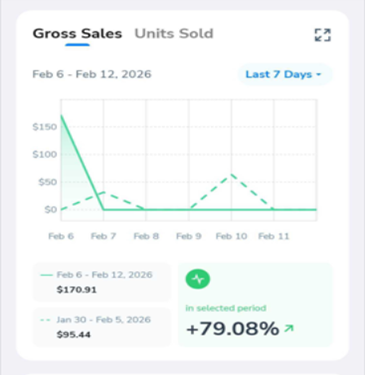
Gross Sales & Units Sold
Displays total revenue and unit performance within your selected date range. Includes start and end dates, and percentage comparison to the previous period.
Sales Trends
Identifies products with increasing or declining performance. This helps you prioritize restocking winning ASINs or optimizing underperforming listings.
Favorite Products
Quickly access products you have marked as favorites for close monitoring.
All Products
View all ASINs in your catalog along with their sales, revenue, and performance data.
Refunds
This section displays your refunded products within the selected time period.
Note: The graphs and charts in the Profits section of the app cannot be downloaded. To obtain a copy of the chart or graph, you can download them via the Web App.
Helium 10 Ads Dashboard
The Ads section provides an overview of your Amazon PPC campaign performance.
Available Advertising Metrics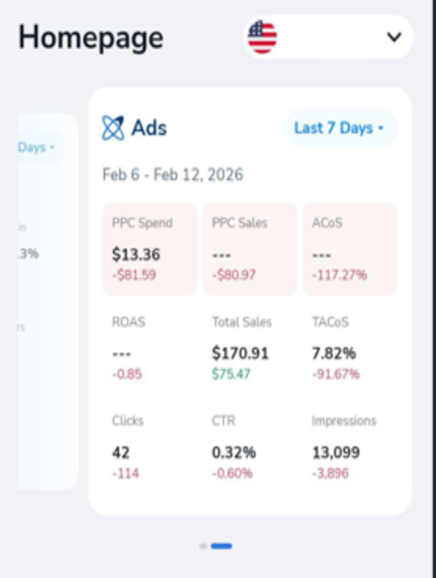
- PPC Spend – Total advertising spend.
- PPC Sales – Revenue generated from ads.
- ACoS – Advertising Cost of Sale.
- TACoS – Total Advertising Cost of Sale.
- ROAS – Return on Ad Spend.
- Total Sales – Combined organic and paid revenue.
- Clicks – Number of ad clicks.
- CTR – Click-through rate.
- Impressions – Total ad views.
- Total Sales and TACOS are only available if you connected an MWS token and activated Profits.
Tip: Green values indicate growth compared to the previous period, while red values indicate a decline.
Performance Graph
The Performance graph visually displays campaign trends. Use filters to customize which metrics are displayed, and identify spending inefficiencies or revenue growth opportunities.
Highest ACoS Campaigns &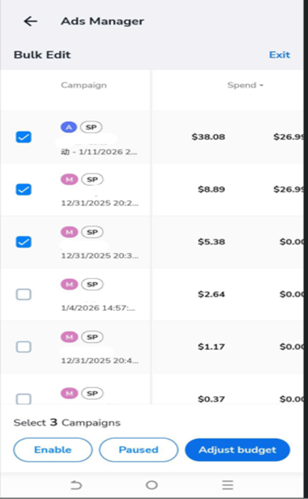 Bulk Management
The Highest ACoS section highlights campaigns
with the largest spend. Using the Ads Manager
bulk-edit or single-edit feature, you can:
- Enable campaigns
- Pause campaigns
- Adjust campaign budgets
- Adjust daily budget
- Select and manage multiple campaigns simultaneously
Note: The Mobile App allows limited functionality to manage your ads. To access full functionality and manage your campaigns, it is recommended that you use the web application instead.
Updates Tab (Alerts Tool Integration)
The Updates tab displays real-time notifications generated by the Alerts tool. These notifications help you monitor critical listing changes and account events.
You can filter alerts by:
- Event Type (e.g., Title Changed, Category Changed, Buy Box Lost)
- Specific Product (ASIN selection)
- Date Range (Today, Yesterday, This Week, Custom)
Tap the brush icon to clear notifications and keep the alert feed up to date.
Learning Tab
Access Helium 10 blogs and podcasts directly from the app. Content is synced with Helium 10’s education platform and updated regularly.
Account Tab
The Account tab lets you manage your personal preferences and support options.
- Language Select – Choose your preferred interface language.
- Supported Languages:
- English
- Chinese
- Deutsch
- Spanish
- Italian
- Japanese
- Supported Languages:
- Send Feedback – Submit feature suggestions or report issues.
- Leave a Review – Rate the mobile app experience.
- User Support – Contact Helium 10 support via email.
- Account Settings – Request permanent account deletion (irreversible).
- About the App – View the current app version.
Note: Sub-users can switch between accounts using the profile dropdown within the Account tab.